About Java Applets…
What Were Java Applets?
In the early days of the Web, HTML could only produce static pages. To make websites interactive or run complex calculations, developers relied on Java applets. These were small, compiled Java programs embedded directly into a webpage. When a visitor loaded the page, the applet ran inside a dedicated sandbox using a background tool called the Java Runtime Environment (JRE).
Applets paved the way for browser-based games, interactive scientific models, and secure file transfers long before modern web standards existed.
The Fall of the Applet: When and Why?
Java applets relied on an underlying browser architecture from the 1990s called NPAPI (Netscape Plugin Application Programming Interface). Over time, this aging architecture became a major source of browser crashes, hangs, and severe security vulnerabilities. Because applets required a third-party plugin to connect the browser to a local Java installation, they became a prime target for malicious exploits.
As standard web technologies like HTML5 and JavaScript became powerful enough to handle complex interactions natively without plugins, the industry began to move on. Google Chrome led the charge by permanently removing NPAPI support in September 2015. Other major browsers eventually followed suit, with Mozilla Firefox completely removing NPAPI support (except for Flash) by early 2017. Oracle officially deprecated the browser plug-in with the release of Java 9.
The Modern Workaround: CheerpJ Applet Runner
Although native browser support is gone, you can still run legacy applets using the CheerpJ Applet Runner. Developed by Leaning Technologies, this browser extension allows you to experience classic Java applets safely on modern browsers like Google Chrome and Microsoft Edge.
Rather than relying on the outdated NPAPI system or requiring you to install Java on your computer, CheerpJ works by converting the legacy Java Applet into modern WebAssembly and JavaScript on the fly. It operates entirely on the client side within the secure boundaries of your browser. This means it does not contact any external servers or collect analytics, making it a safe, private way to view historical web content.
How to Get the CheerpJ Applet Runner
You can install the extension directly from your browser's official add-on store:
- Google Chrome: Available in the Chrome Web Store.
- Microsoft Edge: Available in the Microsoft Edge Add-ons store.
- Opera, Brave, Vivaldi, etc.: As these are Chromium-based browsers, they are fully compatible and can install the extension directly from the Chrome Web Store link above.
- Mozilla Firefox: The extension is not currently supported on Firefox, as it is designed specifically for Chromium-based browsers.
Once you've installed the extension make sure it appears on the browser extension bar. It will be greyed out. When you are on a page or site which used Java applets click thet greyed out icon and enable the domain to use CheerpJ.
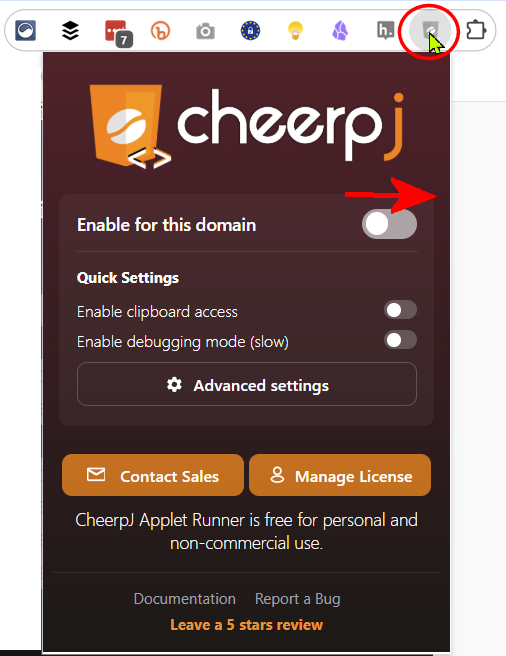
Once you've set the domain to use CheerpJ it will remember and Java applets on the site will now work after a brief CheerpJ flash. Here - try it on this page Deer Creek
 Click image to zoom in / out