Welcome to the JayDax Showcase
As you can tell from our website title, this is an information site. We offer advice and assistance with most Web related items. We aim to be informative, helpful and to some extent; 'fun'.
Back in 1995, when I first started to use Internet, I came across a web page which showed a building behind a shimmering lake of 'water'. I didn't know what it was but took the web page apart to find out how it was done. What I'd found was a 'Java Lake Applet' and I soon learnt how to create them and other Java Applet pages.
By 1997 we were producing Java Applet pages for others. 'Showcase' grew out of our collection of these pages. We've coupled them with midi or mp3 files and the details of the artist and where you can get them.
BUT
The web changed and browsers stopped supporting Java applets because of security vulnerabilities. All our showcase pages stopped working. That's a shame because it's an archive of early web history! The ultimate late-90s web showcase.
There is hope though. It is possible to make these original pages work by using modern HTML5 and Javascript rather than Java. For me rebuilding it is going to be a highly satisfying project but will take some time.
But is there an easier method? It's possible that you can ask an AI to animate the water in the original image. As far as I know there is no AI which can produce an effective looping mp4 file and it is left to you to fix that bit of the animation. Here's my attempt; perhaps someone with better video editing skills than I have could do better.
Which ones are our favourites? We still like the original Java Lake page we produced - Serenity. It was very much a discovery page for us since:
- Jay experimented with Java applets and PaintShop Pro
- We discovered the wonderful paintings of Thomas Kinkade
- Jay discovered he liked Enya's music
- We both found that two heads were better than one when it came to poetry
- JayDax was in the process of being created
We've put together a sequence of pages showing our favourites and, in best Isaac Asimov tradition, we've added some comments explaining just how they came to be done and why we like them.
What about the web history bit? If you really want to see how the old Java applet pages looked then it is still possible, but you'll have to add a browser extension. The one you need is CheerpJ , install it then configure it to work when on the jaydax.co.uk website. You can then safely see the old Java applet pages which all have urls ending in '.htm' rather than '.html'. Here's one such page favourite.htm to start you off.
Now what about video editing software?
If you are working on a MS Windows machine then Microsoft offers a good, free and simple to use video editor - Clipchamp
BUT
It insists on using OneDrive for storage and that's a poor idea if you have a slow connection to Internet (and also a poor idea if you have thousands of small files) so try this program:
Kdenlive
It's also free and more powerful than Clipchamp
Get it from https://kdenlive.org
BUT
It's not easy to set up, you'll have to download extra stuff to make it recognise mp4 files. Get those extras here https://www.gyan.dev/ffmpeg/builds/ Look for a zip file containing release essentials and unzip it to a C:/ffmpeg folder on your PC. You'll then need to configure Kdenlive to use them. To do that in kdenlive click Settings > Configure Kdenlive then select the Environment section and look for paths related to FFmpeg or MLT environment, and browse to point them to the bin folder you placed on your C: drive when you unpacked the files (e.g., C:\ffmpeg\bin\). Do that for these settings:
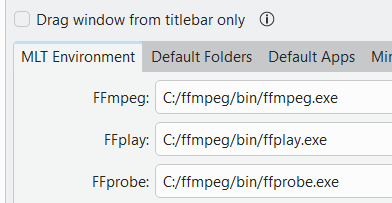
Kdenlive will now work but it ISN'T a simple program to use and its help guide doesn't look like it was written for Windows. Get an AI or Youtube video to help. It's worth the effort.
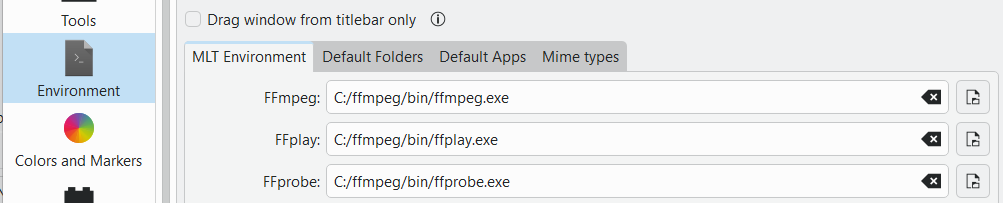
 Click image to zoom in / out